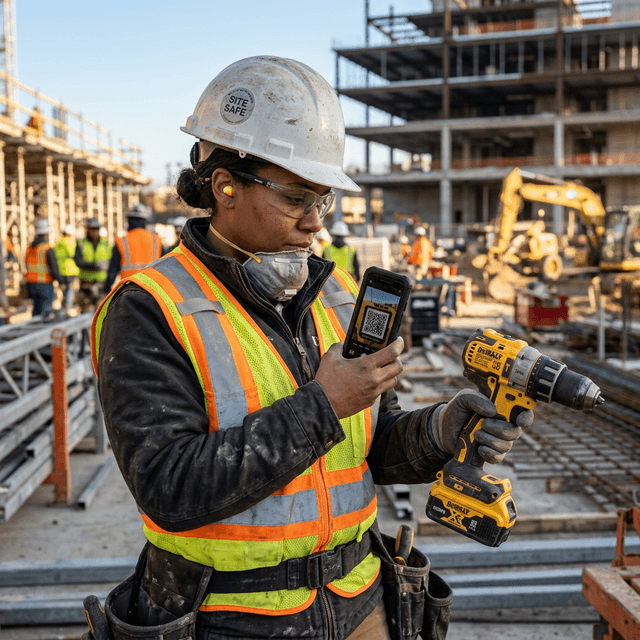
Every contractor has the same story: you show up Monday morning, open the gang box, and half your tools have "walked off" over the weekend. Or worse — your foreman spends 30 minutes every morning playing detective, trying to figure out who has the impact driver.
The reality is brutal. According to the National Equipment Register, construction tool and equipment theft costs the industry $300 million to $1 billion annually in the United States alone. And that doesn't count the hidden costs: downtime while crews wait for replacements, emergency runs to Home Depot, and the frustration that makes good workers quit.
But here's the thing — most small contractors (1–10 people) aren't losing tools to sophisticated thieves. They're losing them to disorganization. Tools end up in the wrong truck, on the wrong job site, or in someone's garage because "they forgot."
So how do you actually keep track of your tools? Let's break down 7 methods, from dead simple to high-tech, and figure out what makes sense for your crew.
1. The Honor System (a.k.a. "Just Remember")
How it works: You don't track anything. Everyone just... remembers what they took.
Why contractors use it: It's the default. No setup, no cost, no friction.
Why it fails:
- "I thought you had the Sawzall"
- Nobody admits to losing anything
- Tools "grew legs" = nobody's accountable
- Insurance claims become impossible without records
Cost: $0 upfront, $5,000–$30,000/year in lost tools
The honor system works great until it doesn't — and by then, you've already lost thousands.
2. Whiteboard / Paper Sign-Out Sheet
How it works: A whiteboard or clipboard at the gang box. Workers write their name next to the tool they're taking.
Why contractors use it: Simple, visual, low-tech.
Why it fails:
- Nobody fills it out when they're in a rush (which is always)
- Handwriting is illegible
- Paper gets wet, lost, or ignored
- No historical data — once you erase the board, it's gone
- Can't access it from a different job site
Cost: $20 for a whiteboard
3. Excel Spreadsheet
How it works: A shared Excel file (usually on someone's laptop or Google Drive) listing all tools with columns for who has what.
Why contractors use it: Familiar, flexible, free.
Where it breaks down:
- Can't scan a QR code from Excel
- Multiple people can't update it at the same time on-site
- Data gets stale — nobody updates it in real-time
- Formatting breaks when someone edits on their phone
- No alerts when something goes missing
Cost: Free (Microsoft 365 or Google Sheets)
Excel is actually a decent starting point if you're organized. We even offer free Excel templates designed specifically for construction crews. But most teams outgrow it around 100+ tools.
4. Spray Paint & Engraving (Physical Marking)
How it works: You spray-paint all your tools a distinctive color (hot pink is popular — nobody steals a pink Hilti), or engrave your driver's license number.
Why contractors use it:
- Visually identifies ownership at a glance
- Deters casual theft (nobody wants to explain a pink drill)
- DL# helps police recover stolen tools
Limitations:
- Doesn't tell you where the tool is or who has it
- Paint wears off
- Doesn't help with insurance claims (no serial number tracking)
- A determined thief doesn't care about paint color
Cost: $5–15 per rattle can
5. AirTags / Bluetooth Trackers
How it works: Stick an Apple AirTag or Tile tracker on each high-value tool. Use your phone to see their approximate location.
Why it's appealing: Set it and forget it. Location updates automatically.
Why it's not enough:
- Doesn't track who has the tool — only where it is
- AirTags cost $25–30 each — at 50 tools, that's $1,250+
- Battery replacement every year
- Only works in areas with dense Apple/Tile networks
- Doesn't create a check-out/check-in record
- Not useful for insurance claims
Cost: $25–30 per tool + annual battery replacement
6. QR Code Scan-and-Go Tracking
How it works: Stick a QR code label on each tool. Workers scan the code with their phone, select their name and job site, and the tool is "checked out." When they return it, they scan again to "check in."
Why it works for small crews:
- Under 10 seconds per check-out
- No app download needed (works in any phone browser)
- Creates a complete audit trail: who, what, when, where
- QR labels cost pennies to print
- Works offline on many platforms
- Generates reports for insurance claims and tax depreciation
Limitations:
- Requires crew buy-in (someone has to do the scan)
- QR labels can get damaged on a rough job site (use waterproof labels)
Cost: $0–25/month for the software + $0.10 per QR label
This is exactly what ScanCrib is built for. We designed a scan-and-go system specifically for 1–10 person construction crews. Learn more about how it works.
7. Full Tool Management Software (Enterprise)
How it works: Comprehensive platforms like Sortly, ToolWatch, or ShareMyToolbox that offer inventory management, barcode scanning, maintenance tracking, depreciation, and more.
Why larger companies use it: All-in-one solution for fleets with 500+ tools.
Why it's overkill for small crews:
- Expensive: $100–$200+/month, often with per-user fees
- Complex: Weeks of setup, training required
- Over-engineered: You don't need purchase orders, IoT integrations, or CMMS modules
- Per-seat pricing punishes growing teams: An 8-person crew on Sortly needs the $149/month plan
Cost: $100–$2,500+/month
Comparison: Which Method Is Right for You?
| Method | Cost | Tracks Who | Tracks Where | Insurance Ready | Best For |
|---|---|---|---|---|---|
| Honor System | Free | ❌ | ❌ | ❌ | 1-person operations |
| Whiteboard | $20 | ⚠️ | ❌ | ❌ | Crews who stay at 1 site |
| Excel | Free | ⚠️ | ⚠️ | ⚠️ | Getting started |
| Spray Paint | $15 | ❌ | ❌ | ❌ | Theft deterrence only |
| AirTags | $1,250+ | ❌ | ✅ | ❌ | High-value items only |
| QR Scan-and-Go | $0–25/mo | ✅ | ✅ | ✅ | 1–10 person crews |
| Enterprise Software | $100+/mo | ✅ | ✅ | ✅ | 50+ person companies |
The Bottom Line
For most small contractors, the sweet spot is clear: start with a spreadsheet, move to QR scanning when you hit 50–100 tools.
The key is to pick a system that your crew will actually use. The fanciest software in the world is useless if your guys won't scan because it takes too long or requires downloading an app.
That's why we built ScanCrib to be dead simple:
- 📱 Works in any phone browser (no app download)
- ⚡ Check-out in under 10 seconds, 3 taps
- 🔒 Works offline on the job site
- 👥 Crew members don't need accounts
- 💰 Free forever for up to 100 tools
Not Ready to Switch Yet?
Start with our free, professionally designed Excel templates. When you outgrow them, import your data into ScanCrib in 5 minutes.
Download Free TemplatesReady to Ditch the Spreadsheet?
Start with our free Excel templates, or jump straight to ScanCrib — free forever for up to 100 tools.
Get Free Templates